Desktop Version 4.0.0.37313
Bug Fixes:
Driver Inspection Photos Now Upload and Display in Inspection Reports: Resolved an issue where photos taken with the camera during a vehicle inspection in the Driver app on Android were never saved, so administrators could not see them. Inspection photos now upload with the inspection and appear in the administrator's inspection report, opening in a new tab when clicked. If a photo fails to upload, the driver is told, and the report shows "No photo uploaded". Completed inspections in the Driver app now show the photo or "No Image Uploaded". Photos missing from inspections completed before this update cannot be recovered.
Arrive and Perform Times Entered on the Desktop Schedule Tab Now Save: Resolved an issue where Arrive and Perform times entered manually on the Desktop Schedule tab sometimes disappeared after saving. Arrive and Perform times now stay saved after refreshing or reopening the Schedule tab, including when entering times on several events on the same run.
Update/Feature Enhancement:
"Show Arrive times" option for the LogistiCare Standard trip sheet (ModivCare) : The Desktop LogistiCare Standard trip sheet now has an optional "Show Arrive times" checkbox. Under Page Set up for Standard Trip Sheets, under LogistiCare Standard, you will see a "Show Arrive Time" check box. When it's checked, both Pick-up Arrive Time and Drop-Off Arrive Time show in the {ick up time section of the report.
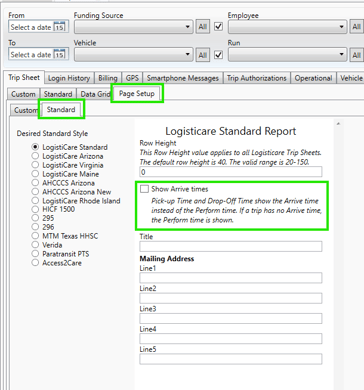
If a trip has no Arrive time, the Perform time is shown. This removes the manual step of editing Perform times to Arrive times before submitting manual billing trip sheets to the ModivCare portal.