Deployment Date: April 23, 2026
Applications: Desktop Client , Version 4.0.0.32038
🖥️ Desktop Application
New Features & Improvements
-
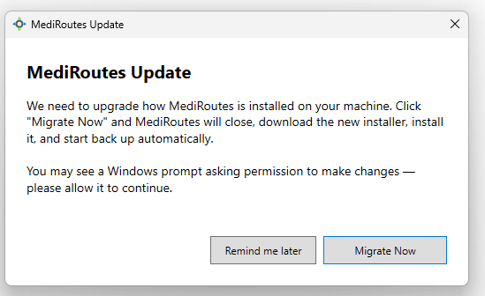
New MSI Desktop Install Message - Users on the older Windows App Installer version of the MediRoutes Desktop app will now see a prompt at their next login to migrate to the MSI installer. The Desktop APP is the Same Desktop, just a new way to install the same Desktop Program.
-
The migration is guided and automated. Users can choose "Migrate Now" or defer with "Remind Me Later." If you only have MediRoutes Desktop Windows App installer version on your PC, you will see message below. Once you chose "Migrate now", the old App Installer Desktop will we removed, and you will be prompt to install new MSI Installer version.
-
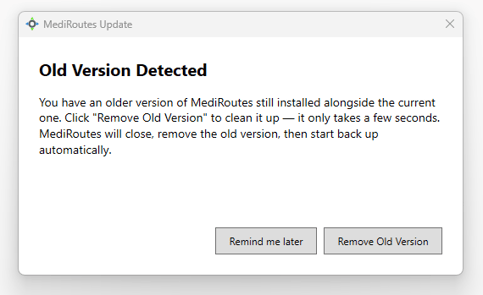
If both versions are detected (MSI Desktop and App Installer Desktop installed on your PC), only the old App Installer copy is removed. Users already on MSI will see no change.
Bug Fixes
Desktop client crashes and stability improvements - Multiple high-frequency crash and null reference issues have been resolved. Updates include fixes for: Violation Sets display, unscheduling trips, map page navigation, trip update saves, customer edits in Supporting Data, trip cancellations on both Home and Dispatch, member cancellation flow, and the trip lateness tooltip. Overall desktop stability is now significantly improved.
🌐 Web Application
New Features & Improvements
Knowledge Base - Now the "Docs" section from Website has been removed. Release Notes and all documentation are now consolidated under the Knowledge Base website, which gives clients one reliable place to find documentation. Link below to Knowledge Base website.
MediRoutes Knowledge Base Website
Legacy Setting - New Settings area, called Legacy Setting, are available in the Edit User section. User can now access Reset Data Grids option, previously only available on Admin, Employee, List tab on Desktop.
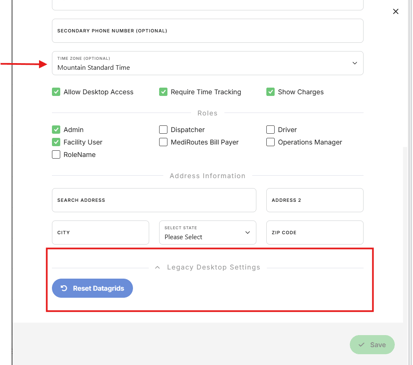
Time Zone Field - Added Time zone selection, seen on creating new users, but was missing from the edit User section. This has been added for parity so admins can update time zones on existing accounts. See screen shot above.
Bug Fixes
Web Dispatch Trip Shopping Screen Sizing issue - When shopping a Trip onto a Run from Web Dispatch, if a Run has a large number of events, the sizing dialog box previously locked to the bottom of the screen, preventing users from scrolling back up to compare other runs. The dialog now scrolls and resizes correctly on both web and mobile.
Users & Roles Filtering for Inactive users - Searching for inactive users in the Users & Roles screen was previously not available. Search precision has been improved across all user states, making it easy to locate inactive accounts.
Un-Canceling a Trip Canceled on Web Dispatch issue - After a driver canceled a trip in the mobile app, un-canceling it via the web was incorrectly marking the trip as Arrived and Performed — with no corresponding timestamps in history. The fix restores the trip to its prior unperformed state and ensures broker webhooks fire correctly to prevent billing and reconciliation issues.