What You’ll Do
-
Add billing item categories
-
Define how each billing item is measured (unit type)
-
Save the billing item for future use when configuring funding source rates
Steps to Create a Billing Item
-
Open the Billing Items Screen
-
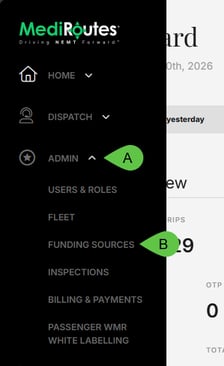
Go to the Admin tab (A), then select Billing (B) and Funding Sources (C) - or just Funding Sources, (B) if you're on the web.
-
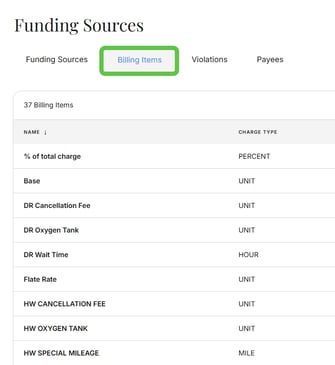
Click the Billing Items tab.

-
-
Add a New Billing Item
-
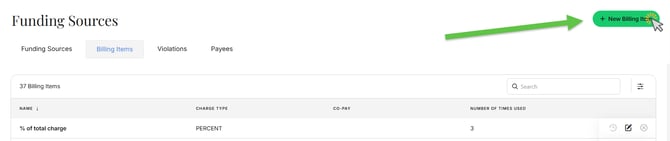
Click + New Billing Item.
-
-
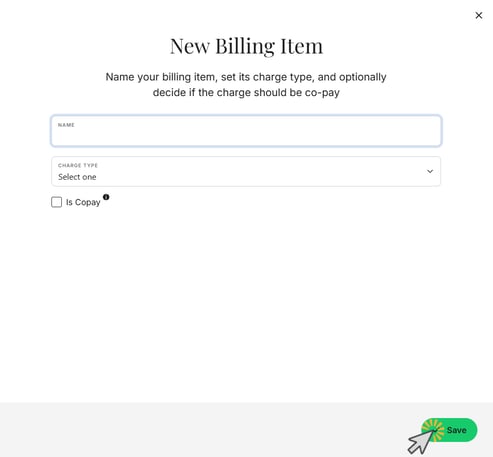
Enter Billing Item Details
-
Name / Description: Enter a clear name (e.g., Base, Mileage).
-
Unit Type: Select how this billing item is calculated:
-
Unit: Used for flat-rate charges that aren’t based on mileage or time.
-
Mile: Used for charges that depend on the trip’s mileage.
-
-
-
Save the Billing Item
-
Click Save to add the billing item to the system.
-
Common Billing Item Unit Types Explained
-
Unit: Use this for charges that apply per event or per trip, as opposed to charges that vary with distance or duration.
-
Mile: Use this for charges that are based on total trip mileage.
What’s Next?
After creating billing items, you can assign them when setting up funding source rates so that trips will calculate the correct charges automatically based on funding source and service type.
Click here to view our guide on setting up new funding sources and rates.