Overview
If you see a “Data error” or "Invalid Credentials" message displayed over the map area in MediRoutes, it means the system is unable to load map data from the mapping service.
This message appears directly on top of the Bing Maps areas within the application.
In most cases, this is caused by a temporary issue with the map service or internet connectivity.
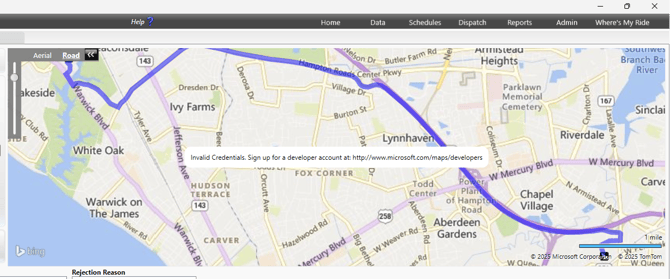
What the “Data Error” Means
The “Data error” message means MediRoutes cannot load the Bing Maps display, usually due to a disrupted or unstable internet connection.
This may occur due to:
- An internet connection issue
- Poor internet quality or lower bandwidth
- High latency or a significant number of dropped packets
This Does Not Affect Trip Data
The “Data error” message only affects the map display.
Trip information and scheduling are not impacted.
What to Do When You See This Message
Check Your Internet Connection
- Ensure you have a stable internet connection
- Try a free online internet test to check bandwidth
- Disconnect and reconnect to your network
- Try again after reconnecting if needed
Tip: If you are seeing internet issues, contact your internet service provider.
Wait and Try Again
- In many cases, this is a temporary issue
- Wait a few moments and reload the app
When to Contact Support
Contact support if:
- The error persists after troubleshooting
- The map does not load at all
- Multiple users on different networks are experiencing the issue
Provide:
- Screenshot of the error
- Description of where it appears
- Date and time of occurrence