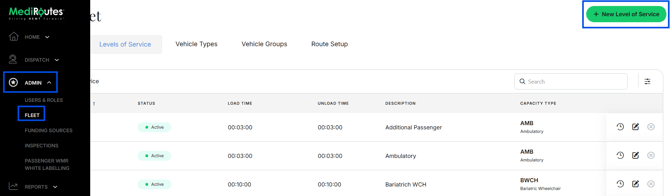
What a Level of Service is
A Level of Service is the type of transport a passenger requires, such as ambulatory, wheelchair, stretcher, or bariatric wheelchair. It defines a capability your fleet offers and determines which trips a vehicle is eligible to carry.
When to add one
Add a new level of service only when you are introducing a capability you do not already offer. If the transport type already exists in your fleet, you do not need to create it again.
- Navigate to
Admin->Fleet - Click
Levels of Service - Click
+ New Level of Service - Complete all required information
- Click
Save - After adding a Level of Service, continue with your fleet setup: create or update the vehicle type, then the vehicle, then the route. See Fleet Overview for more information