What a Route is
A Route (also called a run) is the daily work a vehicle performs, defined by a pullout garage where it starts the day and an ending garage where it returns. Trips are assigned to routes, so a vehicle must have a route before it can carry scheduled trips.
When to add one
Add a route for every vehicle that will run trips.
Important: A Route is run by a Vehicle. If the vehicle does not exist yet, create it first.
Click Here for more information
- Navigate to
Admin->Fleet - Click
Route Setup - Click
+ New Route - Complete all required information, including the
General Info,Garage Address, andSchedule - Click
Save - Your route is now set up and ready to have trips assigned to it.
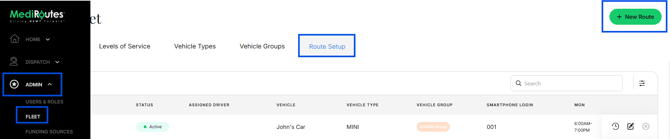
Note: To edit a Route, click Edit (paper & pencil icon)