Before you start: These instructions assume New Dispatch is already live on your account and you're working with dispatcher-level access. If you're not set up there yet, start with New Dispatch setup.
Shop Trip
-
Select service date in the Magic Bar
-
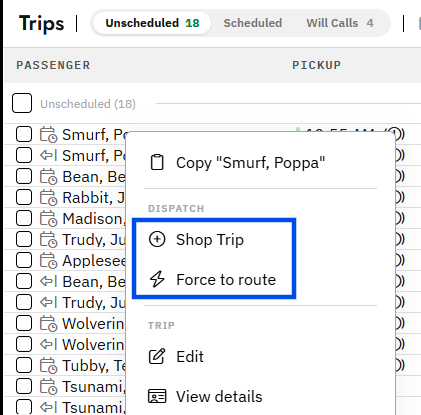
Right Click the unscheduled trip in the trip list
-
Select
Shop Trip -
Review the ranked route recommendations. Each option shows how the trip fits within the route's existing schedule
-
Choose the best-fitting route
-
Click
Add Trip
Tip: Shop Trip is the quickest way to schedule an individual trip when you're not sure where it belongs
Force to Route
-
Select service date in the Magic Bar
-
Right Click the unscheduled trip in the trip list
-
Select
Force to Route -
Choose the route
- Click
Force
Caution: Force to Route bypasses schedule-fit recommendations, so review the route afterward to confirm the trip works within the existing schedule.