Overview
Statuses are normally advanced by the driver in the driver app, which records a GPS location and timestamp at the moment each event occurs. When the driver cannot do it, a dispatcher can update the status from the schedule board.
Every status action is performed by right-clicking the trip.
Before You Start
Confirm you have the correct leg and event.
A round trip is two legs with four events: a pickup and a dropoff on the A-leg, and a pickup and a dropoff on the B-leg. Each event is completed by an arrive followed by a perform. All four events appear as separate rows on the schedule board.
Check the direction indicator and pickup time, or right-click the trip and select Passenger trips to see every leg for that passenger. Applying a status to the wrong event is the most common error in this process.
Updating a Status
- Locate the trip on the
Route. - Right-click the
trip event - Update the
Status - Under
Status, select the action you need. - Confirm the schedule board reflects the change.
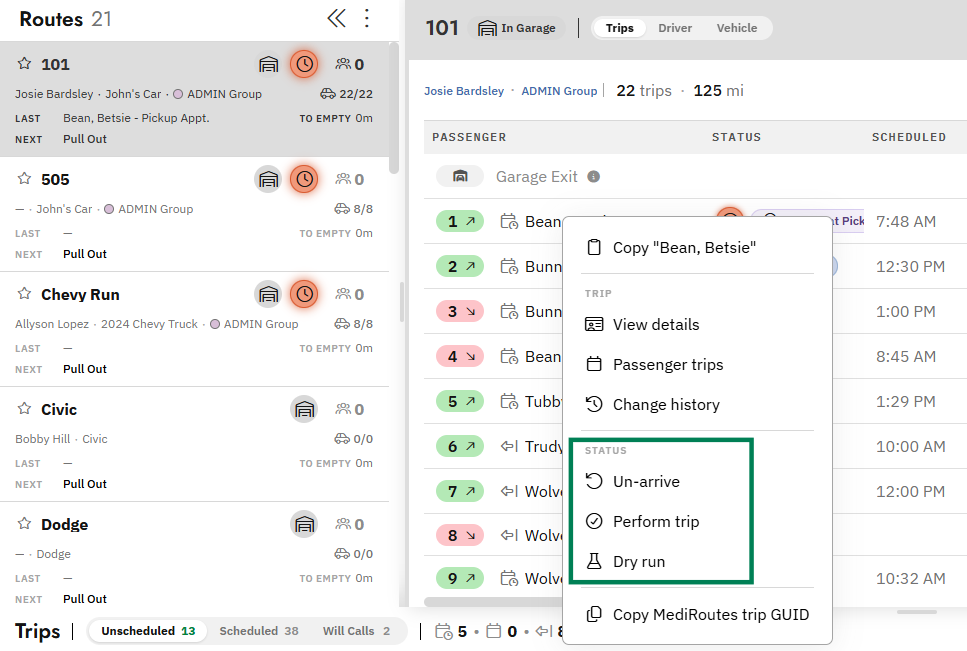
Note: The options listed depend on the trip's current status.