- Select the
calendar datefor the route you want to edit. If you want to edit today’s route, make sure the calendar shows today. - Click the
routeyou want to edit. - Review the
routewith all pickup and drop off events. - Click
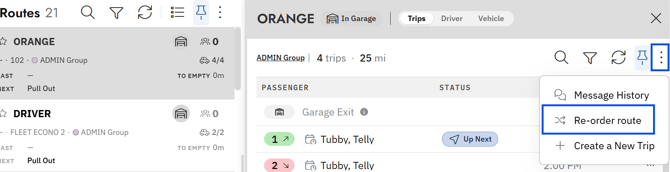
more actions(three dots) in the top right - Click
reorder routein the menu - Drag an event and drop it in its new position to adjust the route sequence. Repeat as needed to get the stops in the correct order.
- Click
Save
Caution: Watch for violation warnings while reordering.